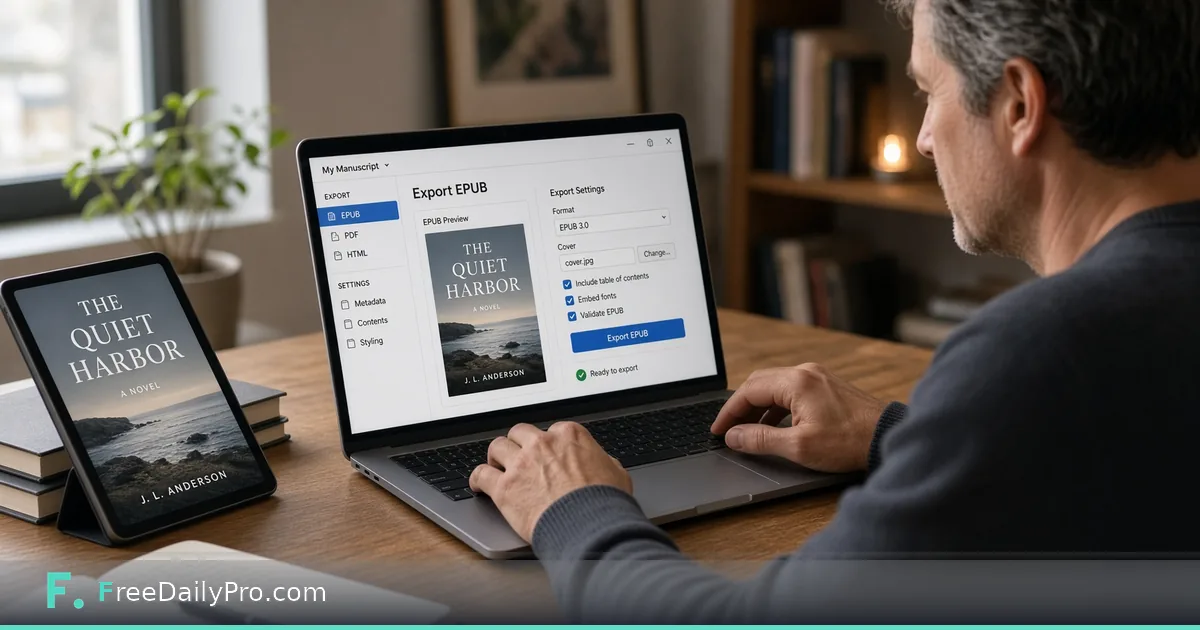
Ebook-Only Publishing Without Wading Through Print Settings
Publish ebook-only with Book Writing Toolbox: unlimited EPUB previews, honest accessibility rules, and pre-flight without print settings clutter.
You only want an ebook. The formatter still asks about trim size, spine width, cover bleed, and gutter. You answer questions that will never touch a reflowable file—then wonder why the process feels heavier than the book.
FreeDailyPro’s Book Writing Toolbox has a real ebook path. Select Draft2Digital, Apple Books, or Kobo Writing Life and print-only sections hide instead of lingering as unused form fields. Ebook-only intent is first-class, not an afterthought.
Print UI for a digital book is the real pain
E-readers reflow text. They do not care that your fantasy novel almost fit a 6×9 trade paperback. They care about structure, navigation, images that still make sense on a small screen, and files that validate.
When a tool assumes print first, authors waste evenings on settings that never affect the EPUB. Worse, “solving” print problems can leave odd defaults when the file finally goes digital.
Ebook mode, practically
Choose Draft2Digital, Apple Books, or Kobo Writing Life. Print-only controls—trim size, spine, back cover—hide. You keep the full chapter editor: headings, lists, tables, images with alt text, scene breaks. You keep multi-project My Books with local browser autosave.
You still write like a writer. You simply stop babysitting a spine. Front and back matter still matter for ebooks—title logic, copyright, about-the-author—without pretending those pages need a wraparound jacket.
Drafts autosave locally per device. Preview, Pre-flight, and Download send content briefly for real typesetting, then nothing is stored afterward by design. Same privacy model as the rest of FreeDailyPro’s browser tools: useful without an account, honest about the brief server step.
What the EPUB actually is
Export is real EPUB 3 with real semantic structure—not a pile of styled divs pretending to be a book. That matters for navigation, accessibility tooling, and store compatibility.
EPUB Accessibility 1.1 / WCAG AA is claimed only when every image has alt text. That condition is intentional. Many tools either ignore accessibility or advertise it whether or not the file qualifies. Here the rule is checkable: missing alt text means you do not get to claim that bar.
Write alt text when you insert the image. Launch-night-you will not remember what figure 3 was for.
Pricing that favors ebook authors
EPUB previews are always unlimited and watermarked, so you can iterate as often as you like without paying.
A clean, unmarked EPUB is included with the Toolbox subscription, the same as a clean print PDF or manuscript file. Book Writing Toolbox is $29.99 a month with a 7-day trial. The $1 Day Pass and the $4.99 plan do not cover it.
If you also produce print, the same subscription covers the clean print PDF. Pure ebook authors can stay on unlimited watermarked previews and start the trial only when a clean file is due to a store or collaborator.
Pre-flight still matters—just scoped differently
Pre-flight Check stays unlimited. In ebook mode it focuses on digital checks: file size, image accessibility, cover resolution, and related EPUB constraints—not print gutter drama you do not have.
Run it before you pay for watermark removal. Fix issues, re-run, then start your free trial when you are actually ready to deliver clean files.
A simple ebook-only workflow
- Create a My Books project and write chapters in the rich-text editor.
- Select Draft2Digital, Apple Books, or Kobo Writing Life.
- Add alt text to every image.
- Preview as often as you need; previews are unlimited.
- Run Pre-flight until digital checks pass.
- Preview the EPUB as often as you like; start the trial only when you need the clean, unmarked download.
You can still export Shunn manuscript format if an agent wants double-spaced pages—even when the commercial plan is ebook-first. Digital-first is not agent-hostile.
Who should stay ebook-only (for now)
First books testing demand, newsletter lead magnets, serials, and projects where print unit economics do not work yet. You can add print later: switch the platform picker to a print target, rebuild cover expectations, and treat Pre-flight as a new checklist—not a formality. Chapters are not locked forever.
Passing Pre-flight means the file is built sanely for the selected path. It does not replace each store’s content guidelines. Read the store’s current help pages before you schedule a launch. Keep image sources larger than the ebook needs; it is easier to optimize down than to invent detail that was never captured.
Why ebook-only is a smart first launch
Print has inventory psychology even when it is print-on-demand: trim debates, spine anxiety, proof shipping time. Ebook-only lets you test cover copy, price, and read-through with less geometry. If demand appears, add print later with eyes open.
Book Writing Toolbox supports that sequence. Chapters stay. Platform picker changes. Pre-flight becomes a new list—not a ritual you fake.
Accessibility is part of craft now
Alt text is not only compliance theater. Screen reader users are readers. The tool’s honest rule—accessibility claims only when every image has alt text—keeps you from shipping a file that boasts a standard it does not meet. Write alt text like a caption for someone who cannot see the figure.
EPUB economics
Because EPUB previews cost nothing, you can send updated watermarked files to an editor, a sensitivity reader, or a street team without paying for each draft. Start the trial the day a storefront or collaborator needs a clean, unmarked package. That is a calmer way to publish than buying a $100+ formatter before you know if chapter two works.
Format an ebook in Book Writing Toolbox